About SQL Server Users and Logins

I think that many developers that work SQL Server do not have a clear understanding of this topic (I used to be one of them) and because of that is that I am writing this post.

Logins vs. User accounts

To connect to a SQL Server instance you first need a login so the instance can authenticate you (know who you are). But to perform operations on a specific database you will need a user account in that database. The user account is used for database access and permission validation. So you could have a login, but if you don’t have a user account associated to that login, you  won’t be able to access that database.

Logins

To create a login you can use the following code snippet.

— To create a login that uses Windows Authentication:
CREATE LOGIN <name of Windows User> FROM WINDOWS; GO

— To create a login that uses SQL Server Authentication:
CREATE LOGIN <login name> WITH PASSWORD = ‘<the password>’ ; GO

The actions you can perform with a SQL Server instance (like create, backup and restore databases) depend on the server roles associated with your login. Once the login is created you can assign it server roles by using the [sp_addsrvrolemember] stored procedure. Possible server roles are: dbcreator, sysadmin and serveradmin among others.

image

User Accounts

User accounts are defined at database instance level, and every user account must be associated to a login, so to create a user account you must provide login.

— To create a user for the myLogin login for the myDatabase database
use myDatabase
create user myUser for login mylogin with default_schema=dbo

As you can see, when creating a user you don’t need to provide a password, because there is already a password associated with the login.What a user can do with the  database is defined by the user’s permissions. Permissions are grouped into Roles and there are three different kind of roles:

  • Database Fixed roles: are pre-defined roles by the system
  • User-defined roles: are roles created by the user
  • Application roles:  are created to support the security needs of an application. (often database applications
    enforce their own security based on the application logic)

When a user is created it is automatically added to the public (fixed) role. To add a user to a role you can use the [sp_addrolemember] stored procedure.

image

Hope you find this useful.

Troubleshooting ASP.NET MVC on IIS 7

Some days ago we had to work hard on this topic to make an ASP.NET MVC application run on IIS7. It took us almost 2 hours, and after completing the task I decided it deserves a post.

I will start by listing the common setup steps and then I will share our particular case.

Solving common issues

First of all you need to have IIS installed and ASP.NET registered, this seems obvious but it must be mentioned. If you installed .NET framework after installing IIS then .NET Framework installation takes care of registering ASP.NET in IIS. But if you installed IIS after installing .NET, then you will have to make the registration yourself. To do this open a Command Prompt (running as administrator), go to the .NET framework folder (typically WindowsMicrosoft.NETFrameworkvXXXX) and execute the command aspnet_regiis –i.

image

Once you have IIS with ASP.NET running, you can create the website or virtual directory for your application, point it to your application folder  and if you are lucky your application is now running.

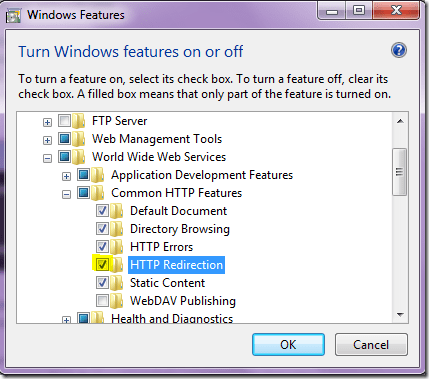
One common issue you can find is that when trying to browse your application you get a blank page, no errors, just a blank page. This usually happens when the IIS HTTP Redirection component is missing. So to fix it, just install this component by browsing Control Panel | Programs | Turn Windows features on or off | Internet Information Services | Word Wide Web Services | Common HTTP features and check HTTP Redirection.

image

Solving our particular case (when you have two different ASP.NET builds installed)

In our case, we had the problem that the machine had installed 2 different builds of ASP.NET v4 (I think these builds corresponded to beta 1 and beta2 versions). After we followed the previous steps, when trying to run the application the app pool try to load the incorrect version (beta 1), it failed and the app pool stopped. We tried  to  re-register ASP.NET, but it didn’t work. In the APP Pool configuration we explicitly set the correct version, but at runtime, it tried to load the incorrect one. How did we solved it:

  • Un-register ALL ASP.NET versions (by running aspnet_regiis –ua).
  • Delete Beta 1 folder located under WindowsMicrosoft.NETFramework.
  • Register again the ASP.NET beta 2 version. (by running aspnet_regiis –i)

That was all, hope this help you.

Website Performance Tools

During these days we (project A2 team) have been working on this topic. We are working on training material about website performance, so we had to review some tools to measure performance.
Below is a list of tools we have reviewed during the last week.

  • FireBug: is a very popular FireFox add-on for allowing to edit, debug, and monitor CSS, HTML, and JavaScript, but it also provides lower level information such as http headers and others.
  • YSlow: is a FireFox/FireBug add-on developed by Yahoo! It analyzes and qualifies web pages from A to F suggesting ways to improve their performance based on a set of rules for high performance web pages. The reports it generates are very nice.
  • Page Speed: is a FireFox/FireBug add-on developed by Google. It performs several tests on web pages that are based on a set of best practices known to enhance web page performance. A score is provided for each page as well as helpful suggestions on how to improve its performance.
  • MSFast: is a browser plugin that help developers to improve their code performance by capturing and measuring possible bottlenecks on their web pages. It has been developed by MySpace.com and currently supports Internet Explorer.
  • dynaTrace: It integrates with Internet Explorer and allows you to diagnose and prevent AJAX performance issues.
  • Visual Round Trip Analyzer: is a standalone application that examines the communications protocol, identifying the causes of excessive round-trips, and recommending solutions. It is browser-independent. You open the tool and it starts recording what happen at network level. Then you browse your website and finally stop the recording. The tool helps you analyze what have happened.

There are some more tools we have reviewed but these are in my opinion the most interesting. You might be wondering why I didn’t mentioned Fiddler. The reason is that Fiddler does not provide any suggestions, it’s a passive tool: just captures the network traffic because its focus is not performance analysis.

On future posts I would like to drill down on each of these tools and I will also provide information about JavaScript profiling and server-side analysis.

How to replace contents of several files

During the last couple of days  I had to replace some words in several text files so I decided to write a Power Shell script to perform this task. Below is the code snippet I used:

$files = get-childitem *.txt
foreach ($file in $files)
{
    $content = Get-Content -path $file
    $content | foreach {$_ -replace "oldText","newText" } | Set-Content $file
}

Enjoy it!

Developing Cmdlets for Power Shell

During the last week I have been working with Iaco in a project about this topic. I found it quite interesting I had some experience in shell scripts but on Linux platform but Power Shell (in honor to its name) seems to be more powerful.

First of all I must say that there are some difference between PS2 and the previous versions, of course that there is backward compatibility, but you must know that PS2 comes with some features that could make your life as a developer much more easy. One of that features is the Windows Power Shell Integrated Scripting Environment, a tool that among other things allow to debug you scripts. Here are some useful resources that helped me:

  • If you don’t know anything about Power Shell you can start with this Getting Started Guide.
  • Then you can follow with this post by David Aiken were you will find info enough to create your first Cmdlets and also a Visual Studio Project Template to do it.
  • Here you will find info about cmdlets concepts like development guidelines, verbs and parameters.
  • But before developing your customs cmdlet review this community project to see if what you need already exists.
  • Finally an interesting resource to look at is the Power Shell Team Blog

I hope this help you.

titiritero: design decisions

During this week I refactored titiritero and in particular the implementation of the gameloop.  The gameloop is a control structure that runs the simulation (give live to model) and updates the views. There are to ways of implementing it:

The first one, is with an infinite loop with a Thread.sleep inside, something like this:

shouldExecuteGameloop = true;
while(shouldExecuteGameloop ){
   this.runSimulation();
   this.updateView();
   Thread.sleep(simulationInterval);
}

The other alternative is using a Timer object and making the gameloop class to implement TimerTask interface, something like this:

Timer timer = new Timer(gameloop);
timer.start(simulationInterval);
...
gameloop.onTimerTask(){
   this.runSimulation();
   this.updateView();
}

I choose the first alternative because with the second one it could happen that the execution of a single loop of the gameloop takes to much time, so there could be more than one thread working simultaneously on the same object, producing an anomalous behaviors of the application.

Smalltalk resources

Curiously during the last couple of days I have received several questions about books and tutorials about Smalltalk. If you are starting with Smalltalk I strongly recommend you to start with “Squeak By Example”, you can download a free .pdf copy from here.

If you need some in Spanish I recommend the book by Diego Goméz Deck, that is available here.

After you had understood the basic concepts I think that two mandatory books are the ones by Adele Goldberg: Smalltalk-80: The Language and its Implementation and Smalltalk-80, The Interactive Programming Environment.

Finally in this page you will get several links to free online books

Hope this help.

VS2008 extension for SharePoint 2007

Last week I started a development project based on SharePoint 2007 and for the first time for this kind of projects I am using Visual Studio 2008 and the corresponding extensions for SharePoint. Among other things, these extension add some projects templates. Yesterday I noticed that these project templates are class library projects, but with a particular behavior. When you right click on the project file there is a “Deploy” option, witch does not exist in the case of regular class library projects. At first I thought that it was because of some properties in the configuration of the project, but I checked it and there was…nothing. So I opened the project file with a text editor and I noticed that the SharePoint project file had the following additional line:

<ProjectTypeGuids>{593B0543-81F6-4436-BA1E-4747859CAAE2};{FAE04EC0-301F-11D3-BF4B-00C04F79EFBC}</ProjectTypeGuids>

It seems that this line is the magic item that adds the “Deploy” option in the VS project file menu. I will try to get some more information about this curiosity.

Complementos Firefox

Estos son algunos complementos que me han resultado utiles.

  • PDF Download: PDF Download relieves the pain experienced when encountering PDF files
    on the Web. Whenever you click on a PDF file, PDF Download lets you
    know before trying to open it, and then offers you choices such as
    downloading, opening, or converting it straight to HTML
  • Video download helper: ayuda a bajar archivos de YouTube
  • DownThemAll: adminstrador de descargas
  • FireFTP: cliente de FTP

Enjoy it!